From Learning AI to Creating Organization-Wide Impact: My Journey as a Consultant


       "How Be10x's Advanced AI Careers Accelerator Program changed how I work as a Consultant"

       "An honest review of Be10x — 3 months after completing the program"

       "From sticking with one product expert to Multiple tools including AI expert: what Be10x actually taught me"

What is the Be10x Advanced AI Careers Accelerator Program?

Be10x's Advanced AI Careers Accelerator Program is a practical upskilling program designed for working professionals who want to integrate AI into their daily work. The program is led by Aditya Goenka, Aditya Kachave, and other experienced trainers who focus on helping professionals use AI tools effectively rather than just learning theory.

The program covers topics such as Generative AI, Large Language Models (LLMs), Retrieval-Augmented Generation (RAG), AI automation, prompt engineering, and various AI productivity tools. I enrolled in the program in 2026 and began applying the concepts immediately in my day-to-day work. I enrolled in March 2026 and am still in mid of the program.

Who I am and what my work looked like before

I'm Burra Charan, a Consultant working in the IT services industry.

Before joining Be10x, a significant part of my daily work involved monitoring application alerts, infrastructure issues, Outlook emails, Teams conversations, incident notifications, and system-generated error messages. After gathering all this information, I had to manually analyse the incidents, patches, Review client meeting with PPT and prepare Root Cause Analysis (RCA) reports for stakeholders.

This process was repetitive, time-consuming, and often consumed 2–4 hours every day. I knew there had to be a smarter way to handle these activities, but I wasn't sure how to leverage AI effectively in my work.

I wasn't looking for a theory-heavy course. I wanted practical knowledge that could immediately improve my productivity and help me solve real business problems.


Why I chose Be10x — and what I looked at first

Before choosing Be10x, I explored several online AI learning resources and self-paced courses. However, what attracted me to Be10x was its practical focus and the emphasis on applying AI in real workplace scenarios.

One statement from Aditya Goenka particularly stayed with me throughout the journey:

"Don't try to dominate AI. Learn to work with AI."

This mindset completely changed how I viewed technology and automation. Instead of seeing AI as a replacement, I started seeing it as a powerful collaborator that could help me achieve more.

From a value-for-money perspective, the course delivered far more than I expected because I was able to apply the learnings directly to a real organizational challenge within just a few months.


What the program actually covered

The Advanced AI Careers Accelerator Program combined practical demonstrations, real-world use cases, and hands-on learning.

Here are the topics that had the biggest impact on me:

Retrieval-Augmented Generation (RAG)

Learning how AI can retrieve relevant information from enterprise knowledge sources helped me understand how to build intelligent solutions that provide accurate and context-aware responses.

Large Language Models (LLMs)

The sessions on LLMs taught me how models process information and how effective prompting can significantly improve output quality.

AI Tools and Use Cases

One of the biggest learnings was understanding which AI tool should be used for which business requirement. Instead of using a single tool for everything, I learned how to select the right AI solution for the right problem.

What surprised me positively was how quickly the concepts could be applied to real workplace challenges.

One limitation was that some topics left me wanting even deeper technical dives because I became highly interested in AI implementation after seeing the results firsthand.

How I use what I learned — one specific workflow

The most immediate change was in how I handle incident management and RCA generation.

Step 1

I collect application and infrastructure alerts from Outlook emails, Teams notifications, monitoring systems, and incident tickets.

Step 2

The collected information is processed using AI techniques and analyzed through a AI-powered workflow.

Step 3

The solution automatically generates RCA insights, summarizes findings, and provides probable causes for incidents.

This workflow currently saves approximately 2–4 hours every day while significantly reducing manual analysis effort.

In addition, I am now working on extending the solution with auto-remediation capabilities, enabling the system to suggest or execute corrective actions automatically.

What I built or changed — the outcome

The most significant achievement was building and implementing an SAMARSmart Alert Management and Auto Remediation inspired directly by concepts learned during the Be10x program.

The solution analyses application and infrastructure issues from multiple channels and generates meaningful RCA outputs using AI.

What makes this achievement particularly special is that the idea originated after I began learning concepts such as RAG, LLMs, AI workflows, and enterprise-grade AI implementation.

Within just One months of starting the training, I successfully submitted the idea, implemented a working solution, and gained visibility across the organization.

The project received positive recognition from leadership and colleagues, also published in a newsletter because of its measurable impact on productivity and operational efficiency.

Beyond the technical achievement, the course also had a positive impact on my career growth. I was recognized as a Top Performer, gained organization-wide visibility for my contributions, and received a X% salary hike, far exceeding my expectations.

At one point, I believed I might receive little or no increment because of previous organizational conditions. However, the value I created through AI-driven innovation helped me stand out and significantly improved my professional growth trajectory.

My honest assessment of who this is genuinely for

Who gets the most out of Be10x's Advanced AI Careers Accelerator Program: Working professionals such as Consultants, Project Managers, Support Engineers, IT Operations teams, Business Analysts, and anyone involved in repetitive analysis, reporting, incident management, or knowledge work.

If you want practical AI skills that can be applied immediately in your workplace, this program can be highly valuable.

Who should probably look elsewhere: If you are looking exclusively for deep machine learning research, advanced AI model development, or a formal academic certification, other specialized programs may be more suitable.

On value for money: For my situation, the program was absolutely worth the investment.

The knowledge helped me build a real business solution, save multiple hours every day, gain organization-wide recognition, and accelerate my professional growth. Even applying a portion of what I learned delivered measurable results.


About the author

Burra Charan is a Consultant working in the IT services industry with 14 years of experience in Middleware Integration domain. I started the AI journey in March 2026 with Be10x's Advanced AI Careers Accelerator Program and quickly began applying the concepts in my daily work. Inspired by the idea of working with AI rather than against it, i built an AI-powered RCA solution that gained organization-wide recognition and saved hours of manual effort each day. As a continuous learner, currently expanding my work into AI-based automation and auto-remediation solutions.


FlatFiles

What is FlatFile?
 A simple text file having data in text format(non formatted text) is called flatfile , flatfiles are used since the advent of computers in business and still they are used widely.

Two Types of flatfiles we can use in webMethods,
 1. With No record identifier.
2. With record identifier.

1.With No record identifier

 How many different types of flatfiles are there based on record parsing methods?

 Flatfiles can be broadly classified into three different types based on the type of their record parsing methods , these three types are :-
 1)Delimited FlatFile
2)Fixed length FlatFile
3)Variable length FlatFile

 Again Flatfiles can be divided into two different types based on the type of field extractors , these are :-
1)Fixed length
2)Nth field
 In Fixed length extractor type each field is defined by its starting index and end index , in this case the length of the field will be constant for every record.

 In Nth field extractor the field is extracted by the position of the field , such as 0,1,2 . the position starts from 0. This is the most widely used extractor type for the flatfiles because it does not limit the size of the field as in the case of Fixed length extractor.

 Delimited FlatFile :- In these kind of FlatFiles , the records are separated by some kind of delimiters such as newline,pipe(|),tab etc. The field extractor can be any of the two i.e fixed length or Nth field extractor.

 Now we can see Delimited FlatFile with the following screen shots,


 First create a text file with the data like below,
Data in the Text file will be like this,


Before going to create flatfile just look out the definitions of FF dictionary and FF Schema

 Flatfile dictionary:- Flatfile dictionaries are created as namespace elements in the Integration Server and contain definitions of records, composites, and fields. When you change a definition in a flatfile dictionary that is referenced in multiple flatfile schemas, the element definition is updated automatically in all of the flatfile schemas.

 Flatfile Schema:- To communicate using flatfiles, we have to create a flatfile schema that contains a particular flatfile’s structural information, including how to identify records and separate those records into fields.

 Create flatfile dictionary

Right click on folder select new and select Flat File Dictionary


Give name to the dictionary and click finish

Now create a Field definition as per the text file in my assumption i created like this

Right click on field definition and click on new


give name of the first field in my case that is EmpNo like wise create EmpName and salary


we have a composite fields in our text file i.e., Address and it has 2 sub fields(area and city)
So we have to create composite field definition and sub fields for this

right click on composite definition and click on new


Give name to the field and click finish


Now create the sub fields for area and city

Right click on Address and click new


In this select field definition

Give Extractor type as Nth field because here there is no fixed positions in the text file and give names as according to text file data in my case area:city

positions are starts from 0,1,2... and click finish

Now create Record definition meaning you have to give one name to the text file data like in database table name


 for example: employeedetails

And then click on EmployeeDetails then click on new we can see below screen


Already we created the field definition so click on field reference and click next

Select the dictionary which already created and click next


Select the field name which already created in field definition, those will appear in the screen only when you save the dictionary and click next

Give Extractor type as Nth field and positions are starts from '0' and in my case position '0' is EmpNo and '1' is EmpName and so on 

Then click finish

Like field reference select composite reference also which already created in composite definition and click next. 


select address and click next 

give position (continue positions from field reference already i gave 0,1,2 so now giving 3)  and click finish. so the flatfile dictionary is created successfully.


 Now lets see how to create schema

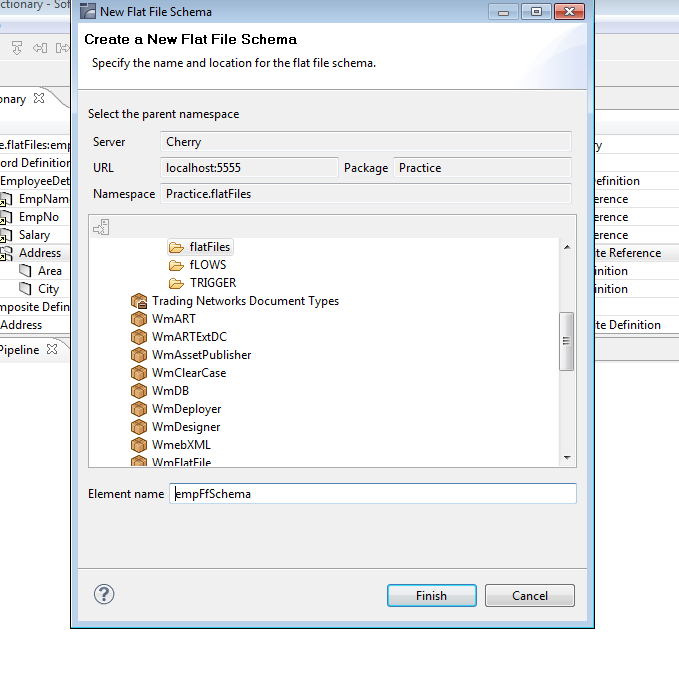
right click on flatfile folder and the click on new flatfile schema and give name then click finish


Select delimiter(most of the cases we use delimiters only) and give the fields as per text document
Record :- Record is seperated by ';' type ';' otherwise if you don't give any record ended then simply give new line.
Field:- Field is ended with ','
subfield:-  is given as ':'
Quoted Release Character :- Quoted release character is used to keep the section of a flat file as it is mentioned in the flat file , any delimiters included within the quoted release character will not be counted.


Then click on FlatFile Structure tab and go to properties browse on set


 And select dictionary then click on next and then finish and save.

and then finish and save.
 Up to above steps flatfile schema is completed successfully.

Now create one flow service and invoke wmpublic----> pub ---> file ----> getfile service


then goto pipeline double click on filename and give fullpath of the file location including name as mentioned above screen shot.

And then click OK.


Again double click on loadAs and select as bytes then click OK

invoke one more service to convert flatfile to document it is located in wmFlatFile ---> pub---->flatFile---->convertToValues service


Then go to pipe line and double click on ffSchema and give full location of ffschema which we created in designer. for eg: Practice.flatfiles:empFFSchema then click ok and then ok.


Now goto pipeline and map bytes to ffdata 

Now run the service like below
Right click and click run as and click run flow service  and one more screen will appears as there is no input like that just click ok.


Now you will get result like below


Will continue record with ID also later....

Get Day in words from a particular date

Take 2 strings, input as 'Date' and output as 'Day'


public static final void GetDayfromDate(IData pipeline) throws ServiceException {
IDataCursor pipelineCursor = pipeline.getCursor();
String dat = IDataUtil.getString(pipelineCursor, "Date");
SimpleDateFormat format = new SimpleDateFormat("dd/MM/yyyy");
try {
Date dt1 = format.parse(dat);
DateFormat format2=new SimpleDateFormat("EEEE");
 String finalDay=format2.format(dt1);
 IDataUtil.put(pipelineCursor, "day", finalDay);
} catch (ParseException e) {
// TODO Auto-generated catch block
e.printStackTrace();
}

}


input:---     22/04/2011
outpu:----   Friday

How to give Naming Conventions in webMethods Deployer?

Lots of people knows how to deploy but people don't know what are names we have to give for SET, BUILD, MAP and DEPLOY. Most of the people will give default names like myDeploymentSet1, myBuild1, myDeploymentMap1 and myDeployment1 but these are wrong.


I will explain you how to give names in a wmDeployer.

Project Name: Give the meaningful name which contain Serial number with project name and date.

Deployment Set: Simply name the Deployment Set according to the type of deployment it contains, e.g. IS or MWS. 

Build: A meaningful name would contain a version number for the build. Just see the previous versions of build can exist or not. A new version number is only needed, if you plan to revert to an older version later. If you only have minor changes to deploy, you can simply re-build the existing version.

Deployment Map: You can define mappings for different target servers or groups. Therefore, the target’s name should be contained in the map’s name.

Deployment Candidate: A Deployment Candidate is simply the combination of a Build and a Deployment Map. This should be reflected in the candidate’s name so you can quickly deploy a specific build to a specific target.

Let me Know if anything Wrong... :)